
IntroductionIn the fast-paced world of retail, warehousing, and logistics, every second counts. Imagine a scenario where your team spends hours manually entering inventory data, only to discover costly errors that delay shipments and frustrate customers. This is where barcode scanners step in as unsung heroes, revolutionizing how businesses operate. But have you ever wondered how these devices transform a simple black-and-white pattern into a powerful tool for efficiency? In this comprehensive guide, we’ll decode the science behind barcode scanners, compare cutting-edge technologies, and reveal how the right scanner can supercharge your workflow.
1. The Science Behind Barcode Scanning: From Light to Data
At first glance, a barcode scanner may seem like a simple tool—but its inner workings are a marvel of precision engineering. Here’s a breakdown of the four key steps that turn a barcode into actionable information:
Light Emission: The Invisible Beam That Powers Scanning
Every barcode scanner relies on a light source to “read” the code. Most use either a laser (for long-distance scanning) or an LED array (for shorter-range, high-speed scans). This light is projected onto the barcode, where it interacts with the alternating black bars and white spaces.
Contrast Detection: The Secret to Accurate Reading
Barcodes work because of light contrast. Black bars absorb over 90% of the light, while white spaces reflect around 80%. This stark difference creates a binary pattern—like a digital Morse code—that the scanner can interpret. Without this contrast, even the most advanced scanner would struggle to read the code.
Signal Conversion: Turning Light into Digital Data
Once the light is reflected back to the scanner, a photodiode array converts these light variations into analog electrical signals. Think of this as translating the barcode’s “light language” into a language the scanner’s computer can understand.
Decoding: The Final Step to Actionable Information
The analog signals are then sent to the scanner’s decoder firmware, which uses complex algorithms to translate the pattern into meaningful data (e.g., product names, prices, or serial numbers). This data is then transmitted to your POS system, inventory software, or mobile app—ready for immediate use.
2. Choosing the Right Scanner: 1D vs. 2D Technologies
Not all barcode scanners are created equal. The three most common types—laser scanners, CCD imagers, and 2D imagers—each have unique strengths and weaknesses. Understanding these differences is key to selecting the perfect scanner for your business.
Laser Scanners: Speed and Reliability for 1D Codes
How they work: Laser scanners use a moving laser beam to sweep across 1D barcodes (the traditional linear codes you see on retail products). They’re fast, accurate, and can scan from distances of 2–24 inches—making them ideal for warehouse inventory checks and high-volume retail checkout lines.
Best for: Businesses that primarily use 1D barcodes and need a scanner that can handle rapid, repetitive scans.
CCD Imagers: Durability for Harsh Environments
How they work: Charge-Coupled Device (CCD) imagers use a static LED array and sensor strip to capture the entire barcode in one go. Unlike laser scanners, they have no moving parts, which makes them more durable and less prone to breakdowns.
Best for: Retail stores, libraries, or document tracking systems where the scanner may be dropped or exposed to dust and debris.
2D Imagers: Versatility for Modern Businesses
How they work: 2D imagers function like mini digital cameras, using image processing algorithms to read both 1D and 2D barcodes (such as QR codes, Data Matrix codes, or Aztec codes). They can even scan codes from 手机屏幕 or damaged labels—making them incredibly versatile.
Best for: Logistics companies, healthcare facilities, or any business that uses 2D barcodes for detailed data storage (e.g., patient records, shipping information).
3. Step-by-Step: How to Use a Barcode Scanner
Using a barcode scanner is simple, but following these steps will ensure accuracy and efficiency:
Step 1: Connect the Scanner
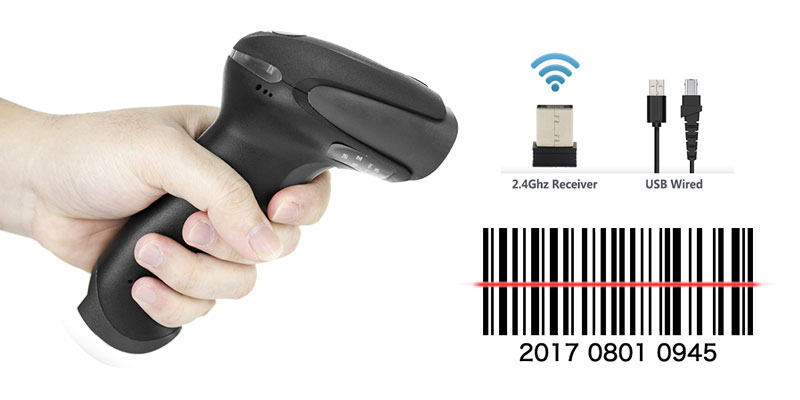
Most scanners connect via USB, Bluetooth, or wireless (e.g., Wi-Fi or RFID). USB is the most common for desktop POS systems, while Bluetooth is ideal for mobile use (e.g., warehouse workers using tablets).
Step 2: Configure the Scanner
Before use, you may need to program the scanner to recognize specific barcode types (e.g., UPC-A, Code 128). This is usually done by scanning a series of programming barcodes included in the scanner’s manual.
Step 3: Aim and Scan
Hold the scanner 2–10 inches away from the barcode and align the beam (or camera) with the center of the code. Press the trigger button (or use auto-scan mode) to initiate the scan.
Step 4: Verify the Data
After scanning, the data should appear instantly in your software. If not, check the scanner’s connection, the barcode’s quality, or the scanner’s configuration.
Step 5: Repeat and Optimize
For high-volume scanning, consider using a hands-free stand to reduce fatigue. You can also adjust the scanner’s settings (e.g., scan speed, beep volume) to match your workflow.
4. Advanced Tips for Maximizing Scanner Performance
To get the most out of your barcode scanner, follow these expert tips:
Keep It Clean
Dust, dirt, and smudges on the scanner’s lens can reduce accuracy. Clean it regularly with a soft, lint-free cloth and isopropyl alcohol.
Calibrate for Your Environment
If you’re scanning in bright sunlight or low-light conditions, adjust the scanner’s light sensitivity to ensure reliable reads.
Update Firmware Regularly
Manufacturers often release firmware updates to improve performance, add new features, or fix bugs. Check for updates every 3–6 months.
Train Your Team
Even the best scanner won’t work if your team doesn’t know how to use it. Provide training on proper scanning techniques, troubleshooting common issues, and maintenance.
5. The Future of Barcode Scanning: What’s Next?
As technology evolves, barcode scanners are becoming more powerful and versatile. Here are three trends to watch:
Integration with IoT
Barcode scanners are increasingly being connected to the Internet of Things (IoT), allowing real-time data sharing between devices. This means you can track inventory levels, monitor equipment performance, and automate workflows—all from a single dashboard.
AI-Powered Scanning
Artificial intelligence (AI) is being used to improve scanning accuracy, even for damaged or poorly printed barcodes. AI algorithms can “guess” missing parts of a barcode, reducing errors and saving time.
Mobile Scanning Apps
With the rise of smartphones and tablets, mobile scanning apps are becoming more popular. These apps use your device’s camera to scan barcodes, making them a cost-effective solution for small businesses or occasional use.
ConclusionBarcode scanners are more than just tools—they’re the backbone of modern business operations. By understanding how they work, choosing the right technology, and following best practices, you can streamline your workflow, reduce errors, and boost productivity. Whether you’re a small retail store or a large logistics company, the right barcode scanner can help you stay ahead of the competition.
Ready to upgrade your scanning system? Contact us today to learn more about our range of barcode scanners and find the perfect solution for your business.